Welcome to Responses
A Response is how the Secure60 platform connects to external systems and sources.
Responses can be as simple as an email or could be an HTTP request to an API endpoint to trigger a specific action.
A Response is an Object in the Secure60 platform that is triggered by a Rule
Response Types
There are 2 main types of Response action within Secure60
- Email
- Allows you to send an email to a user or group
- Webhook
- Allows you to connect to any internet facing HTTP endpoint
- This enables a wide range of integration scenarios:
- Slack and other chat platforms
- Firewall APIs - To allow blocking of IPs
- Active Directory and other user systems - To disable users
- Ticketing and Support platforms
Response Scope and Overrides
A response by default has a scope which indicates whether the Response should fire on a matching Rule.
The scope can be All, SIGNAL or THREAT.
This allows for Responses to only be executed for Theats for example.
Organisations often need to be more specific about how and when a response should be executed, Common scenarios include:
- Alerting the team of “Linux Admins” when a Rule within a Rule Group called “Linux” triggers
- Triggering a Reesponse whenever a Threat is created EXCEPT if the Rule or Rule Group is a specific item
- Creating Responses that are active across the full hierarchy of sub organisations
Response Overrides offer a solution to all of these scenarios and more.
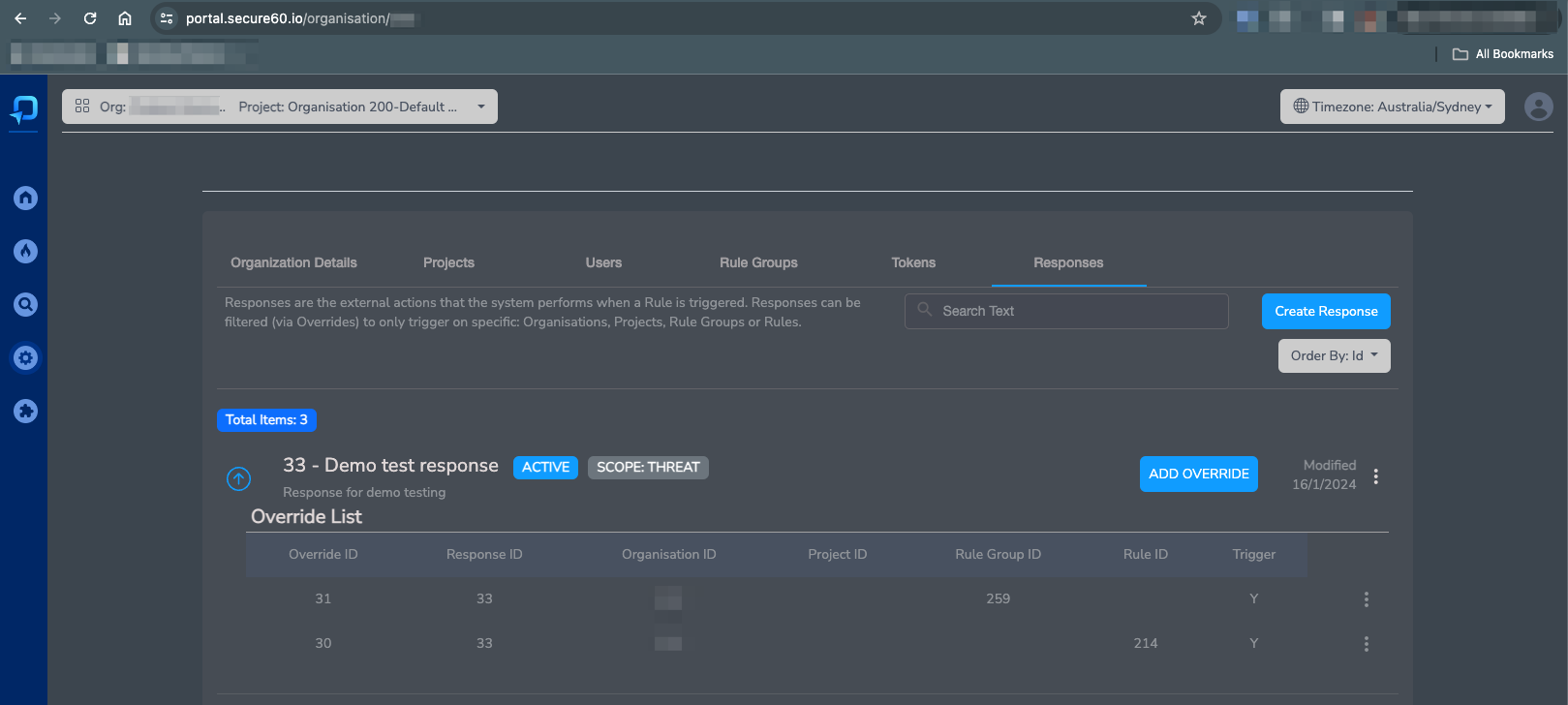
Once a Response has been created you may add Overrides to fine tune the execution scenarios
Example Response Overrides:
Response templating
Within the content of every Response we allow templating. This enables the insertion of dynamic content into the Response data that is sent.
Scenarios where this is useful include:
- Adding Threat, Rule or Event specific information into the email that is sent
- The allows for links to the specific Threat Detail pages to be created for example
- Sending specific entity information via HTTP to external APIs
- This allows for disabling of specific user objects or IP addresses in remote systems
Response templating syntax
Within response fields we support a templating system that gives access to the data related to the rule, signal or threat that generated the response.
Key syntax details:
- If the content of the response field contains {{fieldname}} we will insert the value found in the data for this item
- There is a fallback text option if the field doesnt exist in the format: {{fieldname | fallback text}}
- The templating process is active against all fieldnames, especially useful for:
subject(email Response Type)content(email Response Type)uri(webhook Response Type)request_payload(webhook Response Type)
- Fields available in the template include:
rule_idnamegroup_idstatusproject_idorganisation_idthreat_idsignal_id- ALL fields from the response object (Event, Signal or Entity) that triggered the Rule
 Back to top